
Aim for voice peaks near −6 dBFS and pull the music bed significantly lower the moment speech starts. That single move fixes most muddy narration or podcast mixes on its own. Enable ducking or drop keyframes so it happens automatically, then test the result on a phone speaker before you trust it. Everything else in mixing voice against music is refinement on top of that one decision.
TL;DR:
- Pulling music down by 10 to 14 dB during speech is usually sufficient to achieve clarity without needing aggressive EQ or compression adjustments.
- Most muddy mixes are caused by overlapping energy in the 1.5 to 5 kHz range, which can be cleared by gentle EQ cuts on the music rather than boosting the voice.
- Ducking with automation or sidechain compression should aim for smooth, natural fades with release times slow enough to avoid audible breathing sounds.
- Exported loudness levels of around -14 LUFS do not guarantee a balanced mix; internal levels and frequency masking are critical for intelligibility.
- Using production-aware, mix-friendly stems and arranging music with space for narration before recording can significantly reduce post-production adjustments.
Practical level targets for a clean voice vs music balance
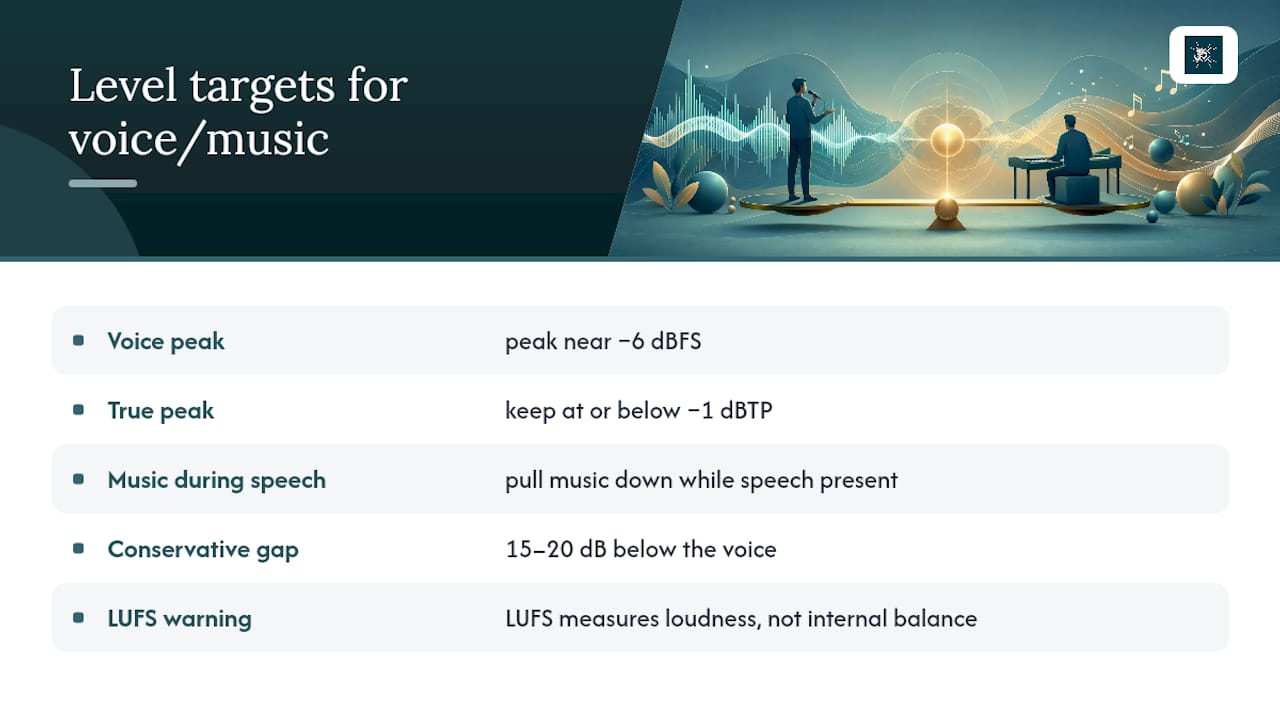
Start with the voice, not the music. Set your narration or dialogue to peak near −6 dBFS, leaving headroom before you touch a single fader on the music track, and keep true peak at or below −1 dBTP to avoid clipping after encoding.
Once the voice is sitting comfortably, bring the music bed down by an appropriate amount during any section where speech is present. That’s the range recommended for AI voiceover mixing, and it holds up just as well for human narration. If you want a safer, more conservative starting point, especially for guided meditation or spoken-word content where every word matters, push that gap to 15–20 dB below the voice, a target CutScore’s mixing guide uses when diagnosing why dialogue gets buried.
Pro Tip: If you’re troubleshooting a mix that already sounds wrong, the fastest fix is often just pulling the music down a few decibels and listening again before you touch EQ or compression at all.
Here’s the trap almost every new editor falls into: they hit −14 LUFS on export and assume the mix is “done.” It isn’t. LUFS measures overall perceived loudness across the whole file. It says nothing about whether your music is drowning your voice inside that average. YouTube and TikTok will normalise your loudness on playback, but neither platform will rebalance your internal mix for you, a distinction worth remembering every time you export.
EQ and masking: frequency moves that clear space for speech
Most muddy mixes aren’t a volume problem at all. They’re a frequency problem. Speech intelligibility lives mostly in the 1.5 to 5 kHz range, and when your music has energy stacked in that same band, your ear has to work harder to separate the two, even if the voice is technically loud enough.
The fix isn’t to boost the voice until it screams over the top. It’s to dip the music instead:
- Pull 2–4 dB out of the music in the 1.5–5 kHz range using a broad, gentle EQ cut
- High-pass the voice at 80–120 Hz to strip out rumble and proximity boom
- Roll off sub-bass in the music bed to stop low-end buildup from muddying the whole mix
Dream Foundry’s guide to mixing spoken word and music makes the same point for audio drama: subtractive EQ on the music almost always beats aggressive boosting on the voice. It sounds more natural because you’re removing competition, not adding harshness.
Pro Tip: Automate the midrange dip so it only kicks in during speech, rather than applying a static cut across the whole track. Music with a static cut sounds thin during instrumental passages, which nobody wants.
Ducking and automation: how to make music step back cleanly
Ducking is the mechanism that does the heavy lifting once your levels and EQ are set, as explained in detail in our guide on how to generate natural AI voiceovers. Three approaches cover almost every situation you’ll meet:
- Speech-aware automation. If you have word-level timestamps or a voice activity detector, automation can drop the music the instant speech begins and bring it back the moment it ends, producing genuinely musical results rather than a mechanical dip.
- Sidechain compression. Without timestamps, route the voice into a sidechain compressor triggering gain reduction on the music bus. Start with 10–14 dB of reduction and adjust attack and release until the dip feels responsive rather than sluggish, avoiding the “pumping” sound of ducking set too fast.
- Manual keyframes. For short clips, hand-drawn automation is still the most reliable fallback. Use gentle fades in and out rather than hard steps, or you’ll hear an audible click at every transition.
Editors working in Premiere Pro can lean on the software’s built in automatic ducking tool as a starting point, then fine-tune by ear.
Pro Tip: If your ducking sounds like it’s breathing, your release time is too fast. Slow it down until the music fades back in smoothly rather than snapping into place.
Quick workflow checklist and verification
A repeatable sequence beats guesswork every time:
- Set voice gain to peak near −6 dBFS
- Apply light compression (roughly 2:1 to 4:1) to even out the performance
- Set a static music bed level as a baseline
- Add ducking or automation to drop the music by about 10–14 dB during speech
- Measure LUFS and true peak before export
- Test the mix on a phone speaker, not just your studio headphones
That last step matters more than most editors admit. Good headphones flatter a mix, filling in bass and separating frequencies your listener’s phone speaker simply can’t reproduce. Reset your ears with a short break before final checks, since fatigued ears tend to favour the music because they’ve stopped registering it as loud. Watch for loop seams in your music bed and remember that a track with a lead vocal or prominent instrument will fight your narration far more than a genuinely instrumental bed.
Tools, presets and reusable settings
Build a voice bus once and reuse it: high-pass filter at 80–120 Hz, gentle compression around 2:1 to 4:1, a de-esser, and a touch of makeup gain. iZotope’s guide to professional vocal sound backs this exact chain as the backbone of a stable, broadcast-ready voice.
For the music bus, keep a template with:
- A 2–4 dB dip in the 200–400 Hz range if the track feels boxy against speech
- A sidechain compressor or saved automation lane ready to trigger
- Instrumental stems on standby, since a finished two-track mix leaves you fighting whatever the mastering engineer already did
When you’re inserting narration into a finished instrumental, tools using Match EQ or sidechain-fed spectral processing can carve space for vocals without raising the voice level at all, which keeps the music’s character intact.
Production-aware mixing: how good composition reduces mix work
Not every balance problem is fixed at the mixing desk. Some of it is decided before a single fader moves, at the composition and recording stage. Music arranged with an editor’s ear, dynamics that breathe, frequencies left open rather than crammed, gives you far less to fix later.
This is where production choices earn their keep. Some orchestral meditation music records with restraint in mind, leaving natural space for a voiceover rather than filling every frequency with orchestral density. Some producers and composers have built careers on arrangements that serve a vocal or narration rather than competing with it, the same instinct that separates a mix that needs heavy processing from one that barely needs touching.
Well-arranged music does half the mixing engineer’s job before the session even starts. Leave gaps, vary dynamics, and the voice finds its own space naturally.
If your meditation or wellness content leans on step-by-step guided meditation techniques, a bed built this way from the start saves you from fighting the arrangement later.
Common problems and how to spot them
Poor voice and music balance tends to produce a handful of recognisable symptoms, and once you know what to listen for, they’re easy to catch before a project ships.
Masking is the most common: the voice is technically audible but sounds effortful to follow, usually because the music occupies the same 1.5–5 kHz band as the speech. Pumping shows up when ducking is set too aggressively, with the music visibly lurching down and back up in a way that draws attention to the mix itself rather than the content. Muddiness comes from low-end buildup, often because nobody rolled off the music’s sub-bass, and it makes the whole track feel congested even when the individual levels look fine on a meter.
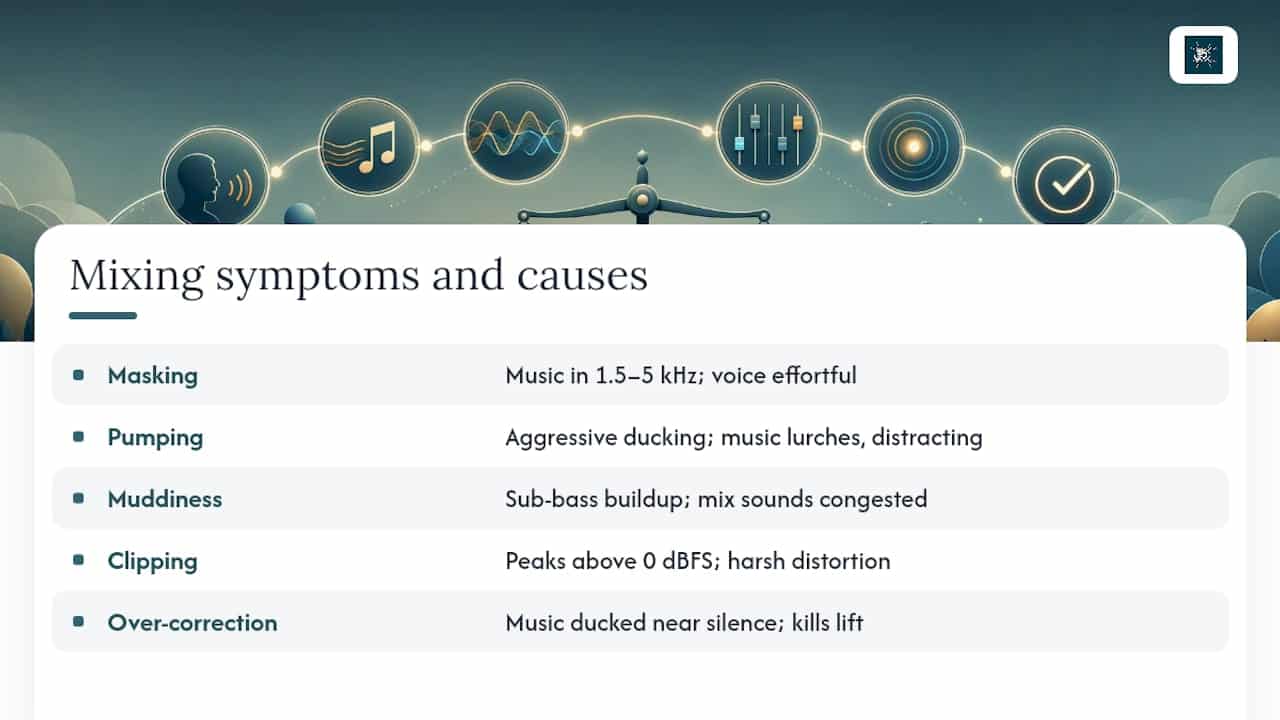
Clipping and distortion appear when voice peaks run too hot, usually above 0 dBFS, and they’re brutal on cheap speakers even if a good monitor hides them. Over-correction is the opposite problem: editors so worried about masking that they duck the music into near silence, killing the emotional lift music is supposed to provide. And inconsistent balance across an episode, where the gap between voice and music drifts scene to scene, usually means levels were set by ear without a consistent gain-staging routine to fall back on.
Genre changes the acceptable margin for each of these. A podcast can tolerate more aggressive ducking than a music video, where the music is often the point. Broadcast content typically needs the most conservative, consistent gap because it’s judged against loudness standards automatically.
When to favour clarity over musical impact
Narration-heavy formats, guided meditation especially, should lean conservative: intelligibility wins every time, even if it means the music occasionally recedes further than feels musically satisfying. Music-first formats can afford more give, letting the bed breathe fully in pauses between lines rather than staying compressed under speech throughout.
Device context matters more than most editors plan for. A mix that sounds balanced on studio monitors can bury dialogue entirely on a phone speaker or in a noisy commute, which is exactly why the phone test earns its place in every workflow, not just the ones with obvious problems.
— ROBERT
Orchestral Meditations: production-friendly stems and licensing
If you’ve ever spent an hour fighting a music bed that refuses to sit behind a voiceover, the problem might be the track itself, not your mixing skills. Some libraries are built around arrangements that follow recommended dynamics leaving room, frequency space that doesn’t crowd the 1.5–5 kHz band your narration needs, and stems are available so you’re not stuck reshaping a finished two-track mix.

That matters whether you’re scoring a guided meditation, a wellness app, or a therapy session recording, since production-friendly music cuts your mixing time considerably compared with a dense, mastered track built for standalone listening. Licensing may cover both personal and professional use, allowing instructors, therapists and app developers to build it into commercial work without a separate negotiation. If your next project needs a bed that behaves itself under a voice from the first export, browse the Orchestral Meditations shop and pick a track built with mixing in mind rather than against it.
Sources
- Why is my music louder than my voice? — CutScore
- AI voiceover mixing: Practical guide (2026) | GoCrazyAI
- Mixing spoken word and music – Dream Foundry
- How to mix vocals to a 2-track beat — Newfangled Audio
- Mixing vocals: what makes a professional vocal sound — iZotope
FAQ
Why does my own voice sound different from a recording?
Your voice reaches your ears partly through vibrations in your skull, adding low-frequency resonance that a microphone never captures, which is why a recorded voice always sounds thinner and higher than the one you hear when speaking.
Is my recorded voice higher or lower than the voice I hear in my head?
It’s typically higher and thinner, since the bone-conducted low frequencies you hear internally are absent from any external recording, leaving only the higher-frequency airborne sound others actually hear.
Why is the music louder than the dialogue on my TV?
Broadcast and streaming mixes often carry wide dynamic range between quiet dialogue and loud music or effects, and cheaper TV speakers struggle to reproduce that range clearly, making the gap feel exaggerated even when the source mix is technically balanced.
How do I fix quiet dialogue and loud sound effects on my TV?
Most TVs include a dialogue enhancement or “clear voice” setting in the audio menu that boosts speech frequencies relative to effects; if that’s unavailable, a soundbar with a dedicated dialogue mode or centre-channel boost usually solves it, since the underlying issue at the source is often the same 10–14 dB gap discussed throughout this guide, just applied unevenly by the original mix.